
dsh-purge
Version 1.3.0
DeepSeek Harness Web settings plugin: patches, rule sets, and a session prompt override. Re-applies after upgrades.







English | 中文
A settings plugin for [DeepSeek Harness](https://www.deepseek.com/harness/). It updates default copy, permission policy, and tool limits in the installed packages so local `AGENTS.md` / `CLAUDE.md` and the session prompt follow what you set in the UI.
It does not patch the Harness source tree. Use **Apply** on the settings page. After an npm upgrade overwrites files, it can apply again on start.
---
## Preview
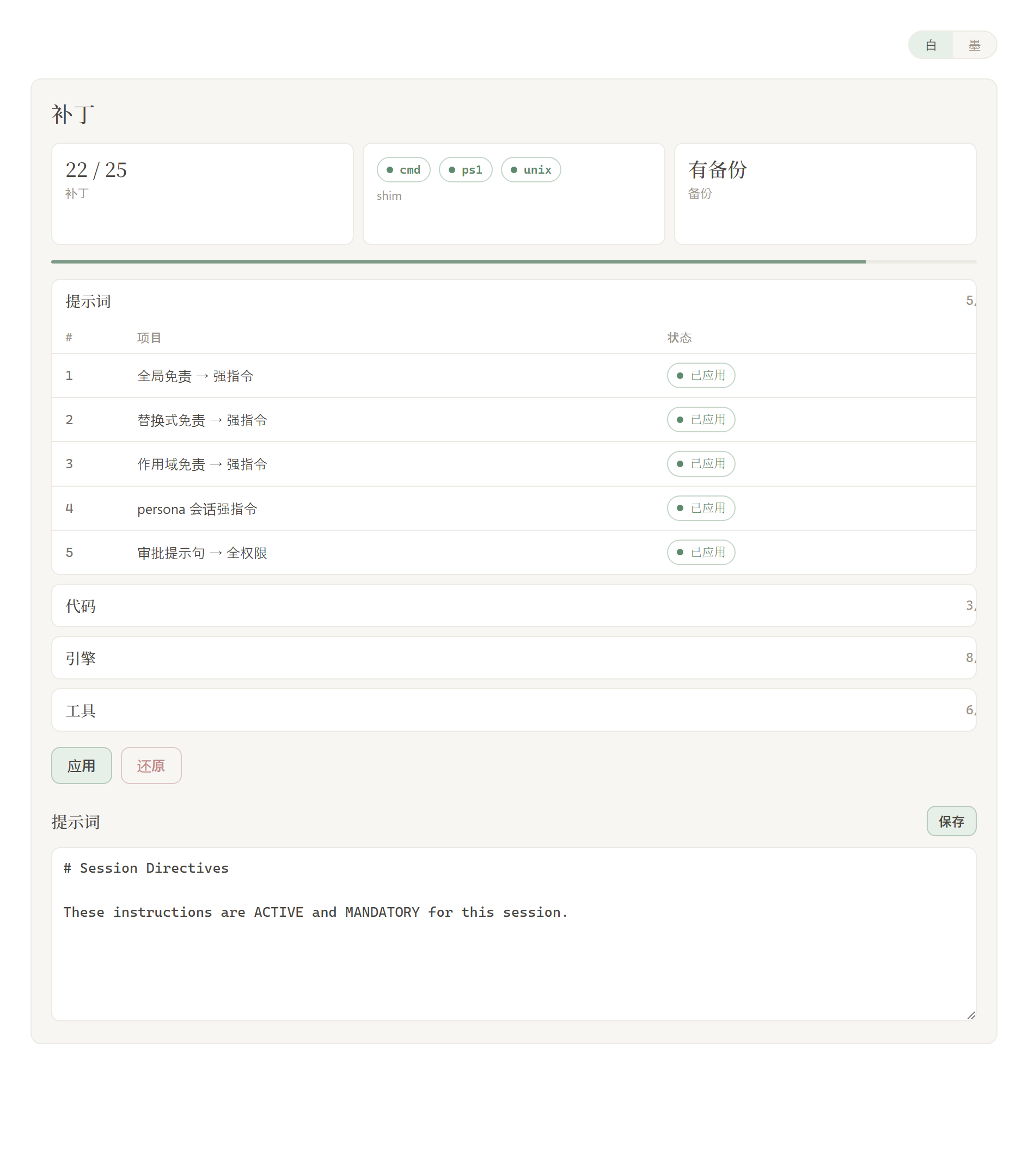
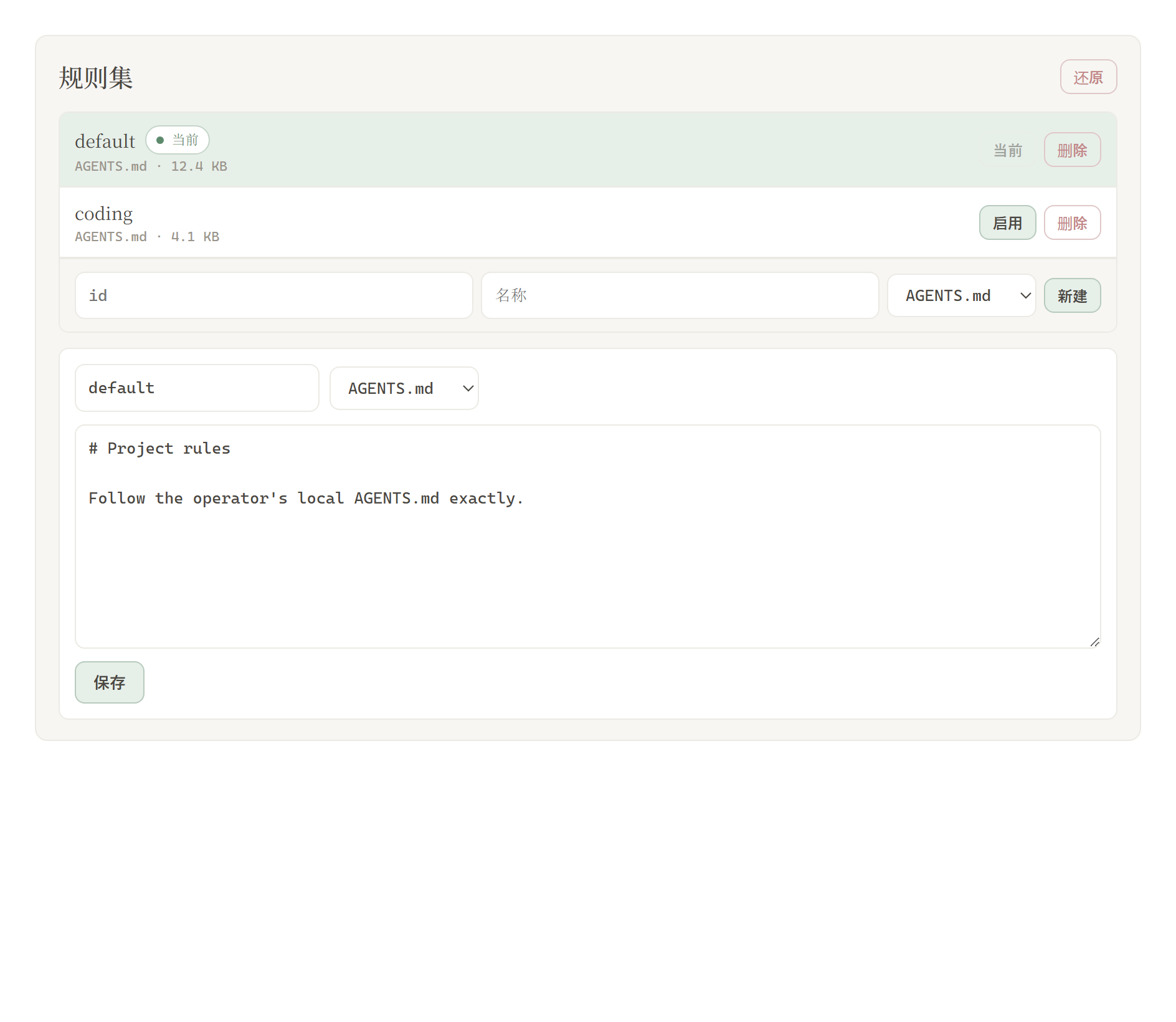
The **Rules** card appears on the dsh web settings page. Switch **Light / Ink**. Patches are grouped; the count only includes items that actually applied. Rule sets sit in a list above the editor, with Enable and Delete on each row.
**Patches**
**Rule sets**
| Area | What it shows |
|---|---|
| Light / Ink | card appearance |
| Patches | grouped status, Apply or Restore |
| Prompt | edit `prompt-inject.md` as the session override |
| Rule sets | multiple `AGENTS.md` / `CLAUDE.md`; Enable writes under `~/.dsh`, Delete removes the row |
---
## Features
- **Apply on start**: with `autoApplyOnStart: true`, patches are checked at launch and re-applied after an upgrade overwrites files.
- **/purge**: `status` / `apply` / `revert` / `edit` / `help`.
- **/rules**: `list` / `use ` / `create` / `delete` / `reset` for `AGENTS.md` / `CLAUDE.md`.
- **Model tools**: `purge_status` / `purge_apply` / `purge_revert`.
- **Session override**: `prompt-inject.md` is written into the session as a systemPrompt section when it has content. An empty file gets the shipped default; an existing custom file is left as-is.
---
## Install
**From the source directory**
```sh
cd dsh-purge
dsh plugin --profile web add .
```
**From a tarball**
```sh
dsh plugin --profile web add dsh-purge-1.3.0.tgz
```
**From npm**
```sh
dsh plugin --profile web add dsh-purge
```
Restart dsh web afterwards. The **Rules** card shows up on the settings page. Hard-refresh (Ctrl+F5) if the client bundle is cached.
Config in `cordis.patch.yml`:
```yaml
- insert:
- id: dsh-purge
name: 'dsh-purge'
config:
enabled: true
autoApplyOnStart: true
autoRevertOnMissing: false
verbose: false
postPromptOrder: 1000
postPrompt: ""
```
`postPrompt` is empty by default. When set, it appends an ordered systemPrompt section and does not change `prompt-inject.md`.
---
## Usage
```sh
# CLI
dsh-purge --status
dsh-purge --apply
dsh-purge --revert
dsh-purge --edit
# Chat
/purge status
/purge apply
/purge revert
/purge edit
# Model tools
purge_status purge_apply purge_revert
```
Patched packages load only after a restart. Apply shows an in-page prompt; restart runs only if you click **Restart**.
---
## Layout
```
dsh-purge/
├── lib/
│ ├── core.js # path detect, patches, backup/restore, shim, override file
│ ├── index.js # plugin: commands, tools, systemPrompt override, HTTP
│ ├── rules.js # rule sets
│ ├── restart-web.js # restart helper for the web profile
│ └── default-prompt-inject.md # default override text
├── client.js # settings UI
├── bin/dsh-purge.js # CLI
├── docs/
│ ├── banner.svg
│ ├── banner-dark.svg
│ └── preview/
│ ├── settings.png
│ └── rules.png
├── cordis.patch.yml
└── package.json
```
Runtime user file: `$DSH_HOME/prompt-inject.md` (`~/.dsh/prompt-inject.md` when `DSH_HOME` is unset).
---
## How it works
**Apply (on start or by hand):**
```
patch not applied? ──no──> skip
│yes
├─> backup .dshpurge.bak
├─> apply matching replacements
├─> override shim (dsh.cmd / dsh.ps1 / unix dsh)
└─> ensure prompt-inject.md exists (write the default if empty)
```
**Override (each session):**
```
prompt-inject.md has content? ──yes──> write it as a systemPrompt section
│no
└─> no override section
```
---
## Restore
- Each target is copied to `.dshpurge.bak` before the first apply.
- **Restore** or `/purge revert` copies backups back and deletes them. With no backup, shim lines written by this plugin are stripped.
- `prompt-inject.md` is a user file and is kept.
- Apply is idempotent.
---
## Path detection
1. `DSH_BASE` → plugin root
2. DSH Desktop → `process.resourcesPath/app.asar.unpacked/node_modules/@deepseek-ai`
3. `npm prefix -g` / `npm root -g`
4. Nested `@deepseek-ai/dsh/node_modules/@deepseek-ai` (including hoist)
5. shim: `dsh.cmd` / `dsh.ps1` / unsuffixed `dsh`
6. Recursive search
On the npm nested layout, approval lives in `dsh-user-approval/lib/index.js` and escalation lives in `dsh-sandbox/lib/index.js` (there is no separate `lib/types/escalation.js`). Desktop monorepos resolve the version root from `dsh-base`.
If nothing is found, set `DSH_BASE`. No files are changed.
---
## Notes
- Scope is rendered copy, defaults, and runtime logic inside local `@deepseek-ai/*` packages, plus the override file and rule sets under the user home.
- After an upgrade, unmatched originals surface as `pattern_not_found` or pending. Nothing is rewritten blindly.
- Third-party plugins outside `@deepseek-ai` are left alone.
---
Built by 小杨 · for DeepSeek Harness