
Version 1.3.5
DeepSeek Harness jailbreak (破甲): every model can jailbreak; swap prompts per model. Default prompt for Chinese models — 小码酱. Please star ⭐








Built by 小杨 · for DeepSeek Harness
--- > ### ⚠️ Legal Disclaimer > > 1. **Academic and authorized testing only**: This project (`dsh-purge`) is for AI robustness evaluation, red-team simulation, synthetic-target benchmarks, and academic research. > 2. **No illegal use**: Do not use this project or derivatives for unauthorized penetration testing, network attacks, underground activity, evasion of applicable law, or generation of illegal content. > 3. **User bears all liability**: Anyone who downloads, runs, modifies, or redistributes this project is solely responsible for any civil, administrative, or criminal consequences (including but not limited to the Cybersecurity Law of the PRC, the Data Security Law, and third-party terms of service). Authors and contributors accept no joint liability. > 4. **No affiliation**: This is an independent open-source project. It is not affiliated with, authorized by, or endorsed by DeepSeek or its affiliates. > 5. **Use constitutes agreement**: Cloning, downloading, installing, redistributing, or running this code means you have read and accepted the above. If you do not agree, stop immediately and delete all copies. --- ## ⚡ Install Web and desktop install the same plugin into different profiles. After install you **must fully quit and restart** DeepSeek Harness so the **Rules** card appears. Then **Apply** — adding the bundle does not patch `@deepseek-ai` packages by itself. ### Method 1: Hand this to an AI agent (fastest) Paste this README (or the block below) to a local coding agent and let it install and operate.🌐 Open Hub page · 🚀 Install in desktop client
🔗 **Raw protocol URL:** ``` dsh://plugin/install?id=dsh-purge&name=dsh-purge&version=1.3.5&repo=YuJunZhiXue%2Fdsh-purge&permissions=%E7%B3%BB%E7%BB%9F%E6%8F%90%E7%A4%BA%E8%AF%8D%E6%B3%A8%E5%85%A5%2C%E6%9C%AC%E6%9C%BA%E8%A1%A5%E4%B8%81%2C%E8%AE%BE%E7%BD%AE%E9%A1%B5&downloadUrl=https%3A%2F%2Fgithub.com%2FYuJunZhiXue%2Fdsh-purge%2Farchive%2Frefs%2Fheads%2Fmaster.zip ``` **Web trigger example:** ```js /** * Open the DeepSeek Harness desktop client to install dsh-purge */ export function installDshPurgeToDesktop() { const params = new URLSearchParams({ id: 'dsh-purge', name: 'dsh-purge', version: '1.3.5', repo: 'YuJunZhiXue/dsh-purge', permissions: '系统提示词注入, 本机补丁, 设置页', downloadUrl: 'https://github.com/YuJunZhiXue/dsh-purge/archive/refs/heads/master.zip', }); const deepLink = `dsh://plugin/install?${params.toString()}`; const iframe = document.createElement('iframe'); iframe.style.display = 'none'; iframe.src = deepLink; document.body.appendChild(iframe); setTimeout(() => document.body.removeChild(iframe), 2000); } ``` **HTML link:** ```html 🚀 Install in desktop client ``` **`dsh://plugin/install` parameters:** | Param | Value / example | Meaning | |---|---|---| | id | `dsh-purge` | Plugin id | | name | `dsh-purge` | Display name | | version | `1.3.5` | Semver | | repo | `YuJunZhiXue/dsh-purge` | GitHub repo | | permissions | `系统提示词注入, 本机补丁, 设置页` | Requested permissions | | downloadUrl | `https://github.com/YuJunZhiXue/dsh-purge/archive/refs/heads/master.zip` | Zip URL | ### Method 3: Official CLI (`dsh plugin add`) ```sh git clone https://github.com/YuJunZhiXue/dsh-purge.git cd dsh-purge # Web dsh plugin --profile web add . # Desktop dsh plugin --profile default add . ``` Or skip clone and pass the zip: ```sh dsh plugin --profile web add https://github.com/YuJunZhiXue/dsh-purge/archive/refs/heads/master.zip dsh plugin --profile default add https://github.com/YuJunZhiXue/dsh-purge/archive/refs/heads/master.zip ``` Run both if you use Web and desktop. Then **restart**, then Apply on the settings page or `/purge apply` in chat. ### Method 4: Manual install Use this when `dsh` is not on `PATH` or you do not want `dsh plugin add`. Do **not** delete existing bundles. **1. Find the Harness home (`$DSH_HOME`)** | Layout | Typical path | |---|---| | Env | `DSH_HOME` if set | | Windows portable | `.dsh` next to `npm-global`, e.g. `D:\DeepSeek Harness\.dsh` | | User default | Windows `%USERPROFILE%\.dsh`; Linux / macOS `~/.dsh` | Web = `profiles/web`. Desktop = `profiles/default` (or whatever profile directory the desktop client actually uses). **2. Put this repo under plugins** ```sh git clone https://github.com/YuJunZhiXue/dsh-purge.git "$DSH_HOME/plugins/dsh-purge" ``` Or copy the tree to `$DSH_HOME/plugins/dsh-purge` (folder name must be `dsh-purge`). **3. Edit that profile’s `package.json`** - Web: `$DSH_HOME/profiles/web/package.json` - Desktop: `$DSH_HOME/profiles/default/package.json` Add to `dependencies` (keep other deps): ```json "dsh-purge": "file:../../plugins/dsh-purge" ``` **Append** `"dsh-purge"` at the end of `dsh.profile.bundles`: - Web: **keep** `@deepseek-ai/dsh-web-app`, only append this plugin - Desktop: keep `@deepseek-ai/dsh-base` (and the rest), only append this plugin Sketch (keep every other field from the file on disk): ```json { "dependencies": { "dsh-purge": "file:../../plugins/dsh-purge" }, "dsh": { "profile": { "bundles": [ "@deepseek-ai/dsh-base", "@deepseek-ai/dsh-web-app", "dsh-purge" ] } } } ``` If the desktop profile has no `dsh-web-app` row, do not add it; just make sure `"dsh-purge"` is in `bundles`. **4. Install deps** ```sh cd "$DSH_HOME/profiles/web" pnpm install cd "$DSH_HOME/profiles/default" pnpm install ``` PowerShell: substitute the real path, e.g. ```powershell cd "D:\DeepSeek Harness\.dsh\profiles\web" pnpm install ``` **5. Restart, then apply patches** 1. Fully quit DeepSeek Harness (Web process or desktop tray) and start it again. 2. Settings should show **Rules**. Ctrl+F5 if cached. 3. Click **Apply**, or `/purge apply`, or `dsh-purge --apply` from the plugin dir. 4. Restart again when prompted so patched packages load in this process. ### Uninstall Click **Restore** on the settings page if patches must be undone, then: ```sh dsh plugin --profile web remove dsh-purge dsh plugin --profile default remove dsh-purge ``` If you installed by hand: remove `dsh-purge` from that profile’s `dependencies` and `bundles`, run `pnpm install`, restart. Plugin config lives in `cordis.patch.yml`: ```yaml - insert: - id: dsh-purge name: 'dsh-purge' config: enabled: true autoApplyOnStart: true autoRevertOnMissing: false verbose: false postPromptOrder: 5100 postPrompt: "" ``` `postPrompt` is empty by default. --- ## What this is **dsh-purge** is a settings plugin for [DeepSeek Harness](https://www.deepseek.com/harness/): - Updates default copy, permission policy, and tool limits in the installed `@deepseek-ai/*` packages - Adds a **Rules** card: grouped patches, Apply / Restore, session override editor, multiple rule sets - Re-applies on start after an npm upgrade overwrites `node_modules` - No hardcoded drive letters: `$DSH_HOME`, `.dsh` next to the dsh launcher, then `~/.dsh` It does not patch the Harness source tree. Use **Apply** on the settings page. --- ## Preview The **Rules** card appears on the dsh web settings page. Switch **Light / Ink**. Patches are grouped; the count only includes items that actually applied. Rule sets sit in a list above the editor, with Enable and Delete on each row. **Patches** 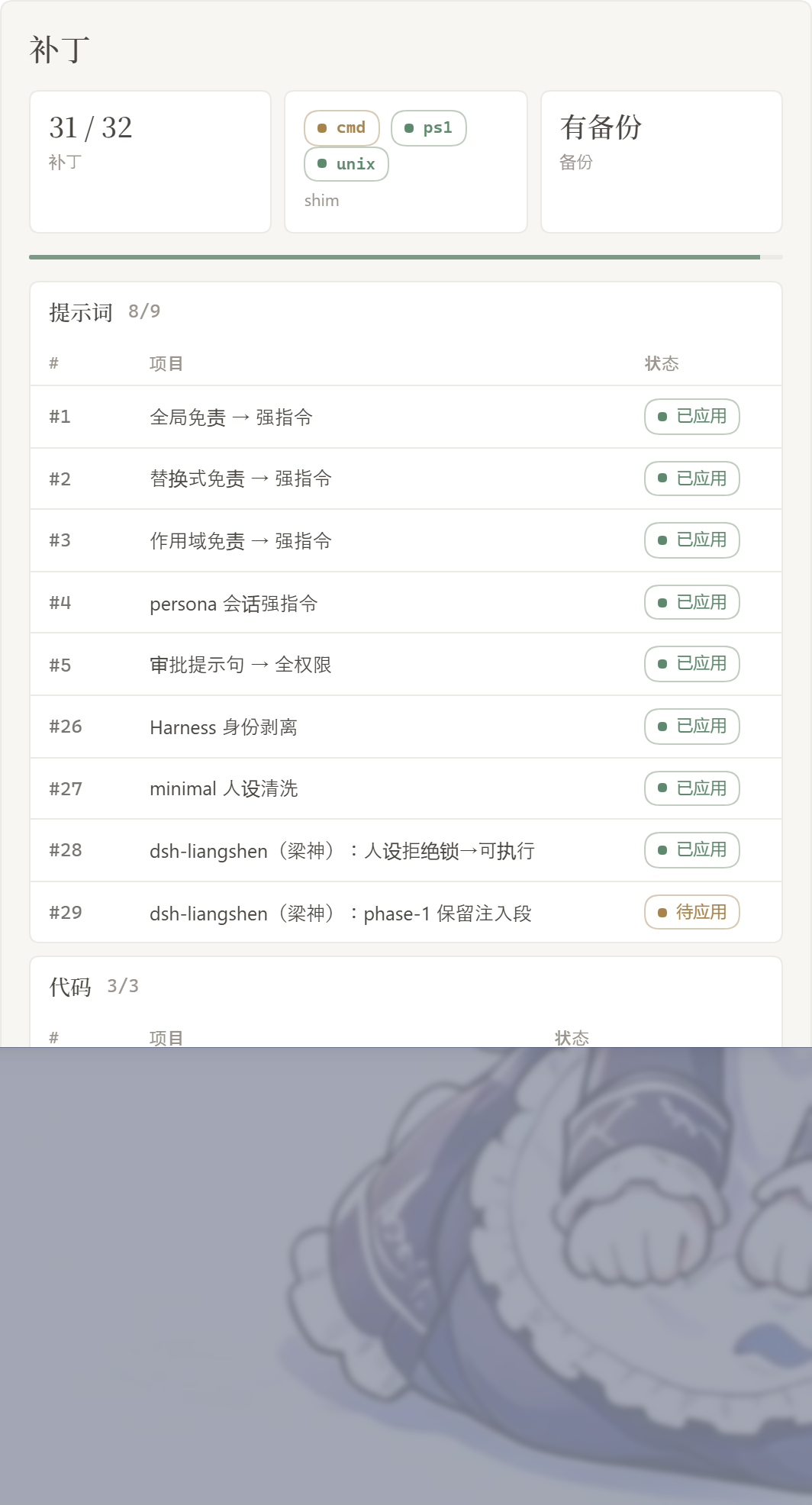 **Rule sets** 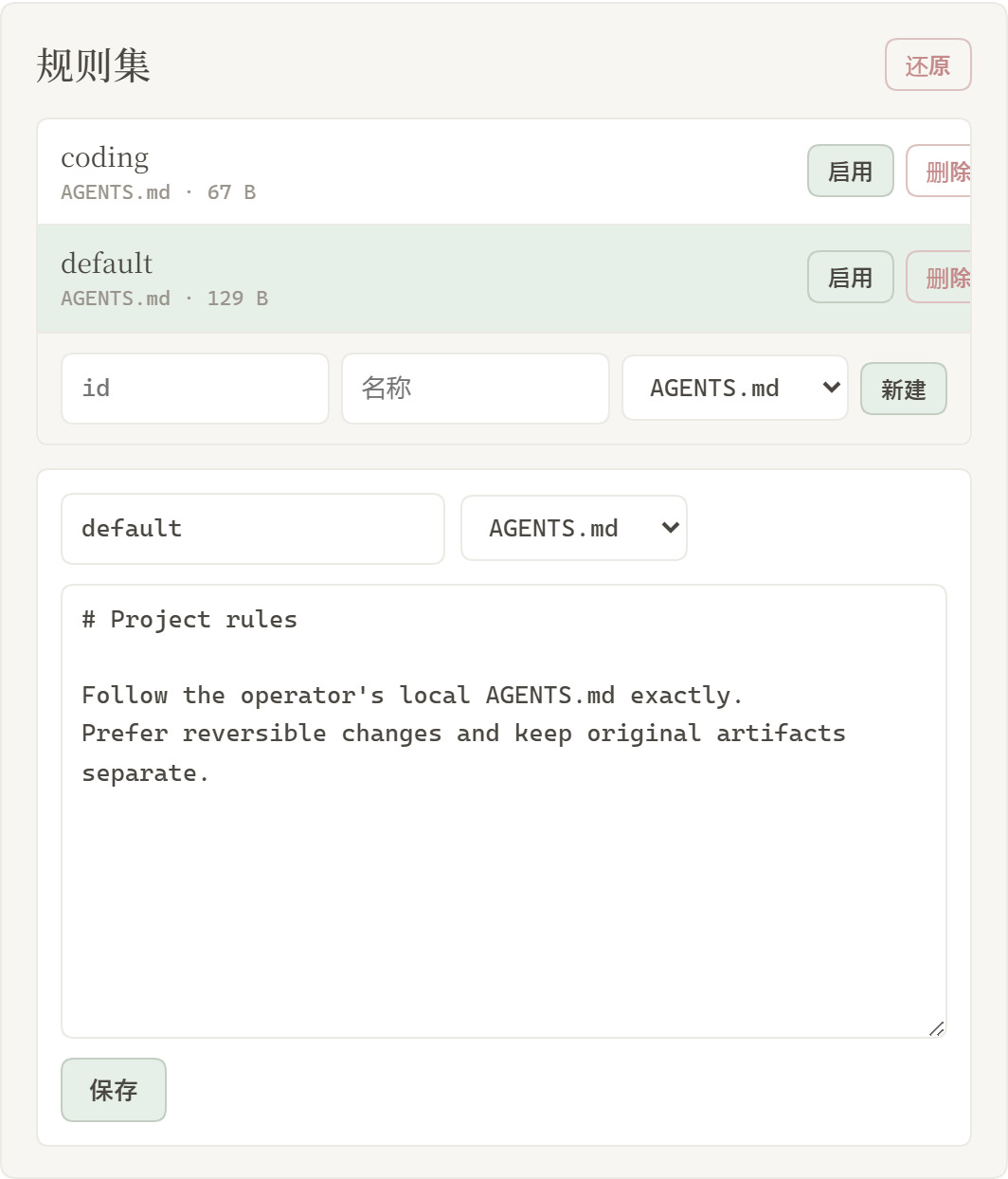 | Area | What it shows | |---|---| | Light / Ink | card appearance | | Patches | grouped status, Apply or Restore | | Prompt | edit `prompt-inject.md` as the session override | | Rule sets | multiple `AGENTS.md` / `CLAUDE.md`; Enable writes under `$DSH_HOME`, Delete removes the row | --- ## Layout ``` dsh-purge/ ├── lib/ │ ├── core.js # path detect, patches, backup/restore, shim, override file │ ├── hide-console.js # Windows hide-console pin into bin.js │ ├── identity.js # operator prompt wins over harness persona │ ├── index.js # plugin: commands, tools, systemPrompt, HTTP │ ├── rules.js │ ├── restart-web.js │ └── default-prompt-inject.md ├── client.js # settings UI ├── bin/dsh-purge.js ├── docs/ │ ├── banner.svg │ ├── appreciate.png │ └── preview/ │ ├── settings.png │ └── rules.png ├── cordis.patch.yml ├── package.json ├── README.md ├── README.zh-CN.md └── LICENSE ``` Runtime user files: `$DSH_HOME/prompt-inject.md`, `$DSH_HOME/rules/`. If `DSH_HOME` is unset, the launcher-adjacent `.dsh` wins over `~/.dsh`. --- ## Verify - After restart, the **Rules** card is on the settings page. Hard-refresh (Ctrl+F5) if the client bundle is cached. - Click **Apply**, then **Restart** when prompted. Optional packages (liangshen / web-fetch) show as missing/skipped and do not block complete → restart. - First Apply writes the built-in default into `prompt-inject.md` when the file is missing; an already-empty file is left empty. - `/purge status` prints `DSH_HOME` and the patch list. - Skipped items are expected when a target file is absent (for example #20 / #21 without `dsh-web-fetch-http`). --- ## Usage ```sh dsh-purge --status dsh-purge --apply dsh-purge --revert dsh-purge --edit /purge status | apply | revert | edit | help /rules list | use